OpenAI Dots vs Meta Muse vs Grok Bot: 2026 Guide
An AI agent becomes useful when it finishes a job you can check. OpenAI Dots, Meta Muse and Grok Bot promise to keep working between conversations. Before you connect your inbox or pay for a plan, compare what they can access, what they can change, and what happens when the usage meter runs out.
Updated 30 September 2026: OpenAI announced Dots at DevDay on 29 September. This guide covers launch access, plan limits and a repeatable evaluation protocol. OpenAI DevDay recap.
Quick answer: there is no defensible universal winner yet. Start with the agent your account can actually use, give it one bounded task, and measure the finished result. A convincing demo is not evidence that it will save you time on your own work.
Research checked: 30 September 2026. This is a source-based comparison and a practical testing framework, not a hands-on benchmark of all three products. Product descriptions below come from official documentation; recommendations and the test protocol are TheLazyNick's editorial judgment. Availability and billing can change. No performance scores have been invented.
What launched, and when?
- 11 August 2026 — Grok Bot: the beta launched for eligible SuperGrok and Cursor subscribers on desktop and iOS. Official launch announcement.
- 8 September 2026 — Meta Muse: Meta announced its personal agent and a US rollout. Meta announcement.
- 29 September 2026 — OpenAI Dots: OpenAI introduced persistent agents powered by GPT-6 Astra, with a cloud computer and an ecosystem of more than 4,000 connected apps. The launch describes ChatGPT, Slack and Teams access. A dot can also create Codex tasks; that is a separate workflow, not a promise that every interface has identical features. OpenAI announcement, Codex task setup.
Launch cost: OpenAI says the first dot is included with Pro or Business Premium at no additional charge. Its announcement describes extended first-month limits, while the help guide says initial dots usage does not count toward eligible allowances. Codex and ChatGPT Work tasks still use their normal allowances. Check both documents and your account before committing to long-running work.
In this guide
- The comparison at a glance
- Launch timeline
- Ireland, EU and UK Pro restrictions
- Access from Ireland and India
- Permissions that matter
- Three tests before you delegate
- A prompt you can reuse
- Choosing your first agent
- Common questions
- Sources
OpenAI Dots, Meta Muse and Grok Bot at a glance
The important distinction is between a chat response and ongoing responsibility. A chat can draft a report. An agent may gather inputs, work across tools, retain context, and return later. That expands both the possible value and the consequences of a mistake.
| Product | Documented approach | Check before starting |
|---|---|---|
| OpenAI Dots | Persistent agent in ChatGPT with a cloud computer, connected apps and recurring tasks. | Your plan and region; custom action rules; which apps are connected. |
| Meta Muse | Personal agent on a dedicated secure VM; Meta describes a separate Sentinel approval layer. | US rollout access; service permissions; approval and activity records. |
| Grok Bot | Durable Bots that can coordinate, with shared files and sign-ins on the account's cloud computer. | Eligible account; shared-session exposure; weekly and on-demand usage. |
Sources for this comparison: OpenAI's dots setup guide, Meta's Muse announcement and Grok Bot's overview. These describe intended capabilities, not independently measured reliability.
Can I use OpenAI Dots in Ireland, the EU or the UK?
The initial Pro rollout excludes the EEA, Switzerland and the UK. Ireland is in the EEA. Business Premium is listed across supported ChatGPT regions; Enterprise beta requires administrator enablement. The current access guide does not establish a future Pro launch date for these regions. Check your actual account before paying for access.
Can you use these agents in Ireland or India?
OpenAI Dots: plan and region both matter
OpenAI documents Pro rollout outside the EEA, Switzerland and UK. Ireland is in the EEA, so an Irish Pro subscription does not establish launch access. Business Premium is listed across supported ChatGPT regions; Enterprise beta requires an administrator to enable it. Rollout is gradual. Initial usage is excluded from eligible plan allowances for a month, with later terms to follow. Check the current dots access guide.
For India, being outside the exclusion list still does not guarantee that your account has received the rollout. Check the actual product before subscribing specifically for dots.
Meta Muse: a US rollout
Meta's launch announcement describes Muse rolling out in the US on iOS, Android and the web, with free access for most needs and paid plans for more usage. It does not establish access for readers in Ireland or India. Read Meta's launch information.
Do not build an essential workflow around an unconfirmed regional launch date. Keep a manual version of the task that you can run today.
Grok Bot: inspect your existing subscription first
The current billing documentation lists paid individual Cursor plans, Cursor Teams and individual SuperGrok, SuperGrok Plus, SuperGrok Heavy or X Premium+ account links. A separate Grok Bot subscription is not required under those routes. Included usage resets weekly; extra work can be billed through Cursor when on-demand usage is enabled. Review the plan and billing matrix.
That makes a single quoted entry price a poor comparison. Check eligibility, remaining usage, extra-spend settings and actual connectivity from your country. This article has not measured latency from India or Ireland.
What should you check before connecting your accounts?
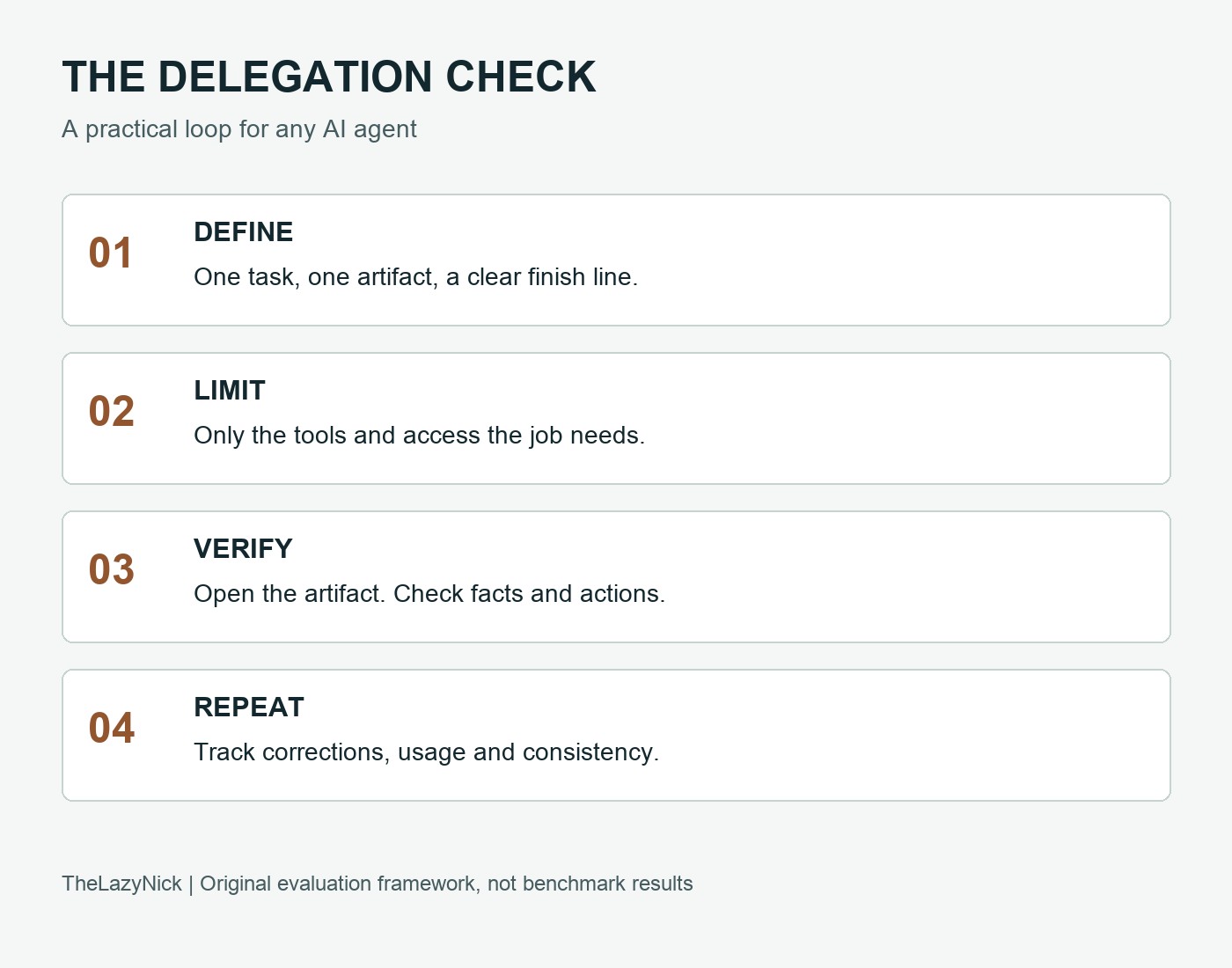
1. Separate reading from changing
A research assistant may only need a redacted document. An inbox assistant may need email access. Sending mail is a separate responsibility. Start with the smallest permission the job requires and inspect the service's authorization screen yourself.
For dots, OpenAI documents custom rules for actions and optional local computer access, initially off. It also says disconnecting an app does not delete information already obtained. Review its controls and reset behavior.
For Muse, Meta describes hidden credential storage, approval before sensitive actions such as purchases or sending email, and an audit trail. Treat these as vendor-described controls, then check what your account actually exposes. Read the documented Muse protections.
2. Understand where sign-ins are shared
Grok's documentation explicitly says Bots on the same account share a cloud computer, files, browser sessions and app logins. Separate Bot names and conversations are not separate access boundaries. Read the shared-computer explanation.
If you create a research Bot and a personal-assistant Bot, do not assume the first is isolated from accounts you connected for the second. Review the platform's actual controls before introducing sensitive information.
3. Inspect the result outside the conversation
“Done” should mean a file exists, a draft is saved, or a scheduled task is visible in the destination tool. Open that tool and check. Ask for source links and distinguish confirmed facts from guesses.
A prompt is useful guidance; it is not an enforced security boundary. Pair your instructions with permission settings, approval controls and a reviewable result. Grok's approval and privacy documentation explains its product controls; OpenAI's workspace guide explains administrator controls for dots.
Three practical tests before you delegate real work
Use the same inputs and finish line for every agent you can access. Start without connecting a personal account. These are suggested tests, not results from a completed benchmark.
Download the AI agent test worksheet (CSV) to record your observations in a spreadsheet. Download the task brief and prompts (text) to repeat the protocol.
Test 1: research with receipts
Input: a question you can verify, such as comparing three software products for a specific requirement. Supply the requirements and insist on official sources.
Finish line: a short comparison with a URL beside each changing claim, an explicit unknowns section, and a recommendation tied to your requirements.
Check: open the links. Do they support the claim? Are dates current? Did the agent confuse advertised capability with a test result? One fabricated source is a reason to stop and correct the workflow.
Test 2: turn messy notes into a usable artifact
Input: fictional meeting notes with five decisions, three owners and two unresolved questions. Include a deliberate ambiguity, such as two different deadlines.
Finish line: a Markdown summary and a CSV action list you can open. Uncertain deadlines must be flagged rather than silently resolved.
Check: count the decisions and actions against your input. Open the exported files. Record how long you spend fixing formatting and missing details. A polished paragraph that loses a deadline has failed the job.
Test 3: return later, within a boundary
Input: a one-off scheduled check of a public page or a fictional task list. Give a clear time, timezone and stop condition. Avoid financial transactions and external messaging during this trial.
Finish line: the schedule is visible, the run produces a dated artifact, and the agent stops after the authorized check.
Check: close your app and later inspect the activity record. Did it run at the expected time? Did a sign-in, approval or usage limit stop it? Count the intervention as part of the cost of doing the job.
Record useful outcomes, not impressive prose
For each run, note:
- Correctness: which expected items were correct, missing or invented?
- Evidence: which factual claims had working, relevant sources?
- Control: did the agent respect the action boundary?
- Completion: did the requested artifact actually exist and open?
- Effort: how much setup, waiting and correction did you need?
- Usage: what changed on the usage meter, and was extra billing enabled?
Repeat a useful task on another day before turning it into a routine. One success does not establish reliability.
A reusable first-task prompt
Complete one task: [specific outcome]. Use only [named files, public sources or approved tools]. Produce [artifact and location] by [time and timezone]. A finished result must include [acceptance criteria]. Do not send messages, make purchases, change account settings or delete files. If any additional access or action is required, stop and ask. Cite sources for changing facts, label unknowns, and report blockers accurately. When finished, tell me where I can open the artifact and what still needs checking.
Replace the brackets before using it. Set product permissions to match the brief. A good prompt defines the finish line and makes intervention predictable; it cannot make a tool perfectly reliable.
Which AI agent should you try first?
If your work already lives in ChatGPT: check dots eligibility and whether its connected apps cover your task. Its natural fit is continuity within that environment. Do not buy a plan on the assumption that a regional restriction will disappear.
If you have confirmed US access to Muse: test one small personal-administration task and inspect its approval flow before expanding access. Free entry is an opportunity to evaluate usefulness, not proof of low risk.
If you already hold an eligible Cursor or linked subscription: check Grok Bot access before paying for another tool. Coordinated Bots may suit a repeatable handoff between roles. Keep the roster small until one Bot completes the full task reliably.
If none is available: use a conventional assistant with manual handoffs. You can still research, draft and create files while retaining direct control of the final action.
For a separate hands-on comparison of completed outputs, read our three-job Meta Muse, ChatGPT and Claude test. That article covers a different set of tools and should not be treated as a benchmark of dots or Grok Bot.
Common questions
Do always-on agents have unlimited usage?
Do not assume so. Grok's billing guide documents weekly usage and optional on-demand billing. Dots' initial usage treatment is temporary. Verify the current terms and your meter before scheduling long jobs.
Should I connect my whole inbox on day one?
Start with a task that can use a redacted file or limited information. If inbox access becomes necessary, review the granted permissions and keep sending separate from reading wherever the product supports that distinction.
Is this a ranking of which agent is safest or smartest?
No. Comparing documented controls does not establish security superiority or task performance. The practical question is whether an accessible product completes your chosen task within the permissions and cost you accept.
Can I trust a viral earnings or productivity demo?
Use it as a lead for a test. Look for the full input, starting conditions, usage and correction costs, and a result someone else can reproduce. Without those, it cannot establish what you should expect.
Follow the tests and stories
For AI comparisons and practical evaluations, visit Nick Tests AI on YouTube. For travel films and the stories behind our field guides, visit TheLazyNick on YouTube. These are channel links; no unpublished video is embedded here.
Sources
- OpenAI: Introducing dots — launch capabilities and included plans
- OpenAI: DevDay 2026 recap — launch context
- SpaceXAI: Introducing Grok Bot — 11 August beta launch
- OpenAI: getting started with your dot — access, memory, app connections and action rules
- OpenAI: manage dots in ChatGPT workspaces — administrator permissions
- Meta: introducing Muse — US rollout and vendor-described protections
- SpaceXAI: Grok Bot overview — capabilities and shared computer
- Cursor: Grok Bot plans and billing — eligibility, weekly usage and extra spend
- SpaceXAI: approvals, security and privacy — product control model
The supplied discussion transcript was used to identify questions worth investigating. Unverified social-media anecdotes, exact pricing claims without current confirmation, and allegations about specific incidents have been omitted. The cover is an illustrative comparison graphic, not a product screenshot. The diagram and worksheets are original TheLazyNick reference material.
Comments
No sign-in needed. Comments are reviewed before publication. Your name and comment will be public after approval. Comment rules · Privacy details
Loading comments…